

What’s New in Qlik Cloud
– June 2026 Updates –
Welcome to the next edition of the ‘What’s New in Qlik Cloud’ blog for June 2026!
Authors: Roger Gray, BI Manager & Tom Cotterill, BI Consultant, at Climber.
Data Analytics
Above all, Qlik delivers a strong set of analytics improvements across Qlik Cloud. This month’s release introduces new visualisation objects, expands AI capabilities into another region, strengthens the Qlik MCP server, improves automation controls, and refines the experience for administrators and app developers. So, here are the key updates.
1. New Slider Object
A new dedicated slider object is now available in the dashboard section. The slider works with both fields and with one or two variables, so it makes it a flexible tool for filtering continuous numeric data such as revenue, price, or time ranges without requiring users to type values manually or rely on dropdown lists.
Styling options include:
- Direction (horizontal or vertical)
- Colour and background customisation
- Range and step configuration
- Label display options
The new slider replaces the slider functionality previously available in the variable input object, providing a more capable and visually consistent alternative.
2. New Image Object
Qlik Cloud now includes a dedicated image object for dashboards. While all chart objects support background images, the new image object is designed to be easier to use for new app developers and is particularly well suited to building multi-layer layouts that mix content types.
The image object supports:
- Images from the media library or by URL
- Opacity and rotation controls
- Mirror and repeat display options
3. Right-Click Menu for Table Columns and Dimensions
You can now right-click items in the Data tab of straight tables and pivot tables to access a full set of management actions. Previously, these actions were only accessible by clicking the options icon next to each individual item.
The right-click menu provides quick access to:
- Move to top / move to bottom
- Hide / show
- Cut, copy, duplicate, paste, and delete
This improvement speeds up the process of managing table columns and dimensions, particularly in tables with many fields.
4. Bidirectional Glossary Term Relationships
When you define a relationship between two glossary terms, the inverse relationship now automatically appears on the related term as well. Previously, term relationships were only visible on the term where they were applied, requiring data stewards to manually maintain relationships on both sides of the connection.
For example, if you relate Active Customer to Customer using the Is a relationship type, Customer will now automatically display Has subtype: Active Customer – with no additional steps required.
The full mapping of applied and automatically displayed relationships is as follows:
| Relationship applied | Relationship displayed on related term |
| See also | See also |
| Synonym | Synonym |
| Replaced by | Replaces |
| Is a | Has subtype |
| Defined by | Defines |
This update gives stewards a complete and consistent view of how terms relate to one another across the glossary. It thereby reduces maintenance overhead and improves the reliability of business terminology governance.
5. Engine Functions in Direct Query Expressions
Direct Query now supports using Qlik Engine functions within $(=…) expressions in KPIs and custom SQL statements. You can use GetUserAttr and if functions to create dynamic, user-context-aware data filtering.
This enables you to implement row-level security and personalised data access in Direct Query applications without loading data into memory. User attributes from the identity provider can be referenced directly in expressions, allowing access control to be applied at the query level for governed, real-time data scenarios.
6. Data Load Editor and Script Editor: Updated Connections Panel
The connections panel in the Data load editor and Script editor has an updated look and feel, alongside practical improvements that speed up working with connections and files.
Updates include:
- Folder browsing is now available directly in the Insert Store statement dialog
- Files and folders can be filtered by name when browsing from a connection
- Faster and more reliable connection panel loading, particularly in spaces with a large number of connections
7. Qlik Answers Agentic Experience Available in the South America Region
The Qlik Answers agentic experience is now available for tenants hosted in the South America (São Paulo) region. Organisations can get started by turning on AI Features in Administration > Settings.
This regional expansion continues Qlik’s rollout of the governed, conversational AI experience to additional geographies. It helps organisations in South America address data residency requirements while benefiting from the full agentic experience.
8. Knowledge Base Search in the Qlik MCP Server
The Qlik MCP server now includes knowledge base search capabilities. LLM clients such as Anthropic Claude and Microsoft Copilot can now search and retrieve information from Qlik knowledge bases, providing answers grounded in your organisation’s curated content.
Two new capabilities:
- qlik_search tool update: Knowledge bases are now included as a searchable resource type alongside existing search targets
- qlik_search_knowledgebase_chunks tool: A dedicated tool that enables targeted searching within specific knowledge base contents, returning relevant document chunks for use in LLM responses
This update is particularly valuable for organisations that have built Qlik knowledge bases from internal documents and want external AI assistants to draw on that curated content in a governed, citable way.
9. Updated Experiment Configuration Panel for Qlik Predict
The Qlik Predict experiment setup experience has been overhauled for usability. The updated layout moves from an accordion pattern to a dual-panel design, aligns with Qlik’s updated design system, and improves labelling and discoverability throughout the configuration flow.
Customers configuring experiments will find the experience faster, cleaner, and more intuitive, reducing the time spent navigating configuration options and making it easier to understand what is being set at each step.
10. UI Improvements for Qlik Answers
The Qlik Answers chat panel can now be expanded to full screen. Click the expand icon in the top-right corner of the chat window to enter full-screen mode. You can seamlessly switch between full-screen and standard view at any time, and source references and citations remain visible while in full-screen mode.
Navigating long conversations is also smoother in this release. The conversation history panel now supports improved scrolling, allowing you to move forward and backward through previous exchanges with greater ease.
11. Direct Access Gateway Knowledge Base Connector
Knowledge bases now support Direct Access gateway as a connection method for pulling in unstructured documents. This allows you to connect knowledge bases to data sources located in private networks that are not directly accessible from Qlik Cloud.
This is particularly relevant for organisations with on-premises document stores or private cloud environments where unstructured content relevant to Qlik Answers assistants resides behind a network boundary.
12. New Direct Access Gateway Version (1.7.14)
Direct Access gateway 1.7.14 introduces new and enhanced features and resolves several issues. Key changes in this release include:
- Improved troubleshooting through gateway configuration propagation: Gateway configurations are now propagated to Qlik Cloud, making it easier for Qlik Support to assist with troubleshooting without requiring manual configuration exports
- Gloo session affinity for reload re-connections: Reload re-connections now use Gloo session affinity, which reduces load on services and improves reload success rates
Qlik advise customers to upgrade to the latest version to benefit from these stability and supportability improvements.
13. New Permission: Manage Engine Assignments for Applications
A new permission – Manage engine assignments for applications – is available to complement the existing application engine assignment feature. This permission allows tenant administrators to delegate engine assignment management to specific users without granting them full Tenant Admin or Analytics Admin rights.
The permission is available only through custom roles and is not included in the User Default permissions. It gives administrators precise control over who can influence compute resource allocation for analytics applications.
14. Changes to Analyzer User Access
To simplify the permission model and align with capacity-based subscriptions, several changes have been made to Analyzer user capabilities:
- Expanded access in managed spaces: Analyzer users now have the same access as Professional users when they hold the Can contribute role in managed spaces
- Private sheets in shared spaces: Analyzer users with any Can edit role can now create private sheets in shared spaces
- Application metadata: Analyzer users can no longer update application metadata in shared spaces
Administrators should review their Analyzer user assignments and space roles to ensure these changes align with their intended access model.
15. Changes to Scheduled Automations
Improvements are coming to how scheduled automations are handled in Qlik Automate. This update begins with improvements to how the next scheduled run is displayed in the Automation history view, and introduces a change to the minimum scheduling period, which is now set to one minute as announced in January 2026.
Customers with schedules using second-grain intervals will see these rounded to the nearest minute with this change. For further detail, refer to the Qlik Automate: 30-second interval deprecation notice on Qlik Community.
16. Configurable Maximum Run Time for Automations
Qlik Automate now lets you configure the maximum run time for each automation, giving you more control over how long an automation is allowed to execute before it is stopped.
Previously, synchronous triggered automations had a fixed limit of 55 seconds, which could cause failures when dependent services – particularly AI models – responded slowly. The new configurable limits are:
- Synchronous triggered automations: Configurable from 55 seconds up to 5 minutes (default remains 55 seconds)
- All other automation types: Configurable up to 4 hours (default remains 4 hours)
Existing automations are not affected unless the setting is explicitly updated. Configure the limit in each automation’s individual settings.
Data Integration
June brings a practical set of updates across Qlik Talend Data Integration, with a good mix of platform control, data quality refinement, and day-to-day usability improvements. From SAP HANA CDC options and SQL Workbench to better run monitoring and more flexible cross-project development, this month’s release focuses on giving teams more visibility and more control over how they build, test, and operate pipelines.
1. New ‘Full record’ option for SAP HANA CDC operations
Qlik now gives you more control over how SAP HANA CDC changes are captured and stored, with a new Record mode setting in SAP HANA data source connections.
You can choose between:
- Primary Key only to minimise storage usage
- Full record to capture complete before-images of changes
The new Full record option reduces load on the SAP HANA system, supports soft deletes on the target, and improves accuracy for latency monitoring.
Note: The Record mode option is available from Data Movement Gateway 2025.11.23.
Learn more: SAP HANA (Database)
2. Updating activated data products in the Marketplace
Activated data products in the Marketplace now have a more controlled update flow. Instead of pushing every saved change straight through to the marketplace copy, edits are now held on the main data product until the manager is ready to publish them.
A new Update in marketplace button appears when there are pending changes, along with a counter showing how many edits are waiting. This gives data product managers room to iterate and refine before exposing updates to consumers.
The data product changelog has also been extended with a dedicated entry for marketplace updates. It thereby makes it easier to see when changes were published and by whom.
Learn more: Updating the data product in the marketplace
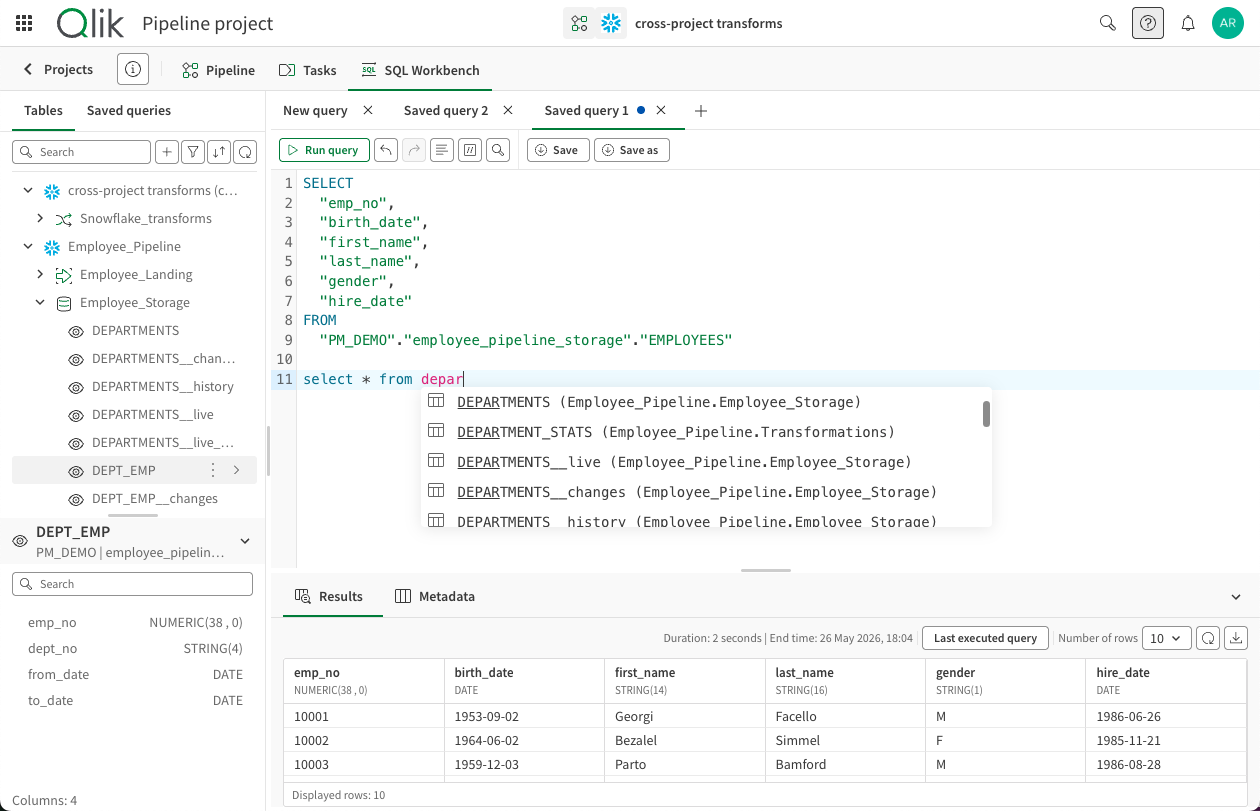
3. SQL Workbench
Qlik Talend Cloud Pipelines now includes a built-in SQL Workbench, giving users a way to explore and troubleshoot pipeline data without leaving the platform.
Datasets can be browsed and queried across tasks, pipelines, and database schemas within a project. Where cross-project references are configured, datasets from related projects in the same workspace can also be queried from the same interface.
The new Workbench brings together a more capable SQL editing experience with features designed for ad hoc analysis, including:
- Multiple tabs for running and comparing queries side by side
- Saved queries that can be stored at project level and shared with team members
- The modern SQL editor experience already introduced in Pipelines, including code completion and multi-query support
For teams working across several tasks and projects, this provides a much more direct way to inspect data, test logic, and investigate issues without switching out to an external SQL tool.
Learn more: Exploring data with SQL Workbench
4. Run monitoring history
Qlik Talend Cloud Pipelines now includes run history monitoring, making it easier to see how a pipeline has been performing over time.
A dedicated run history panel lets you browse past runs for any task type, filter by date range or status, and review execution details and outcomes. This adds a useful historical layer to task monitoring, especially when you need to understand recurring issues or compare behaviour across runs.
The monitoring interface has also been refreshed, with a cleaner layout for tracking task and dataset activity, performance, and status.
Note: The new monitoring UI is available in all regions now. Run history itself is not yet supported in the Europe (Frankfurt) region, but it is expected to be available there from June 2026.
5. Preview validation rule impact before applying it
Qlik now lets you preview the effect of a validation rule before saving or running it, giving you a safer way to refine rule logic during design.
From within the rule designer, you can for example trigger an ‘Inline Impact Preview’ to see how the current rule would behave against your dataset sample. The preview shows both the count and percentage of records that would be marked invalid, along with a filtered sample of the affected rows so you can see what is being caught and why.
You can then adjust the rule and re-run the preview as often as needed, making it easier to fine-tune logic before activation. The preview is based on a computed sample, rather than the full dataset, for performance reasons.
Learn more: Working with validation rules
6. Select a branch for cross-project data sources
When using data from another project in a transform or data mart task, you can now choose which version control branch of the referenced project should act as the source.
The default branch remains main, but this change gives teams more flexibility when building cross-project pipelines. It becomes easier to keep production-to-production flows stable, while also supporting more isolated development-to-development work across projects under version control.
Summary
To sum up, Qlik has provided a well-rounded set of releases for Qlik Cloud Analytics, balancing new visualisation capabilities with AI expansion, governance improvements, and operational refinements. The new slider and image objects give app developers richer tools for building engaging, interactive dashboards. In addition, the continued regional rollout of the Qlik Answers agentic experience, now reaching South America, alongside knowledge base search in the MCP server, reinforces Qlik’s commitment to governed AI across geographies and integration patterns.
For administrators, the new engine assignment permission, Analyzer access changes, and configurable automation run times provide more granular control over platform operations. On the data integration side, bidirectional glossary term relationships close a long-standing gap in catalogue governance, making business glossaries easier to maintain and more reliable as a foundation for data literacy.
Overall, this is a strong, workflow-focused release also for Qlik Talend Data Integration. There is more flexibility in how changes are captured, better visibility into rule behaviour and pipeline history, and a much smoother experience for exploring data directly within Qlik Talend Cloud. Add in tighter control over Marketplace updates and branch-aware cross-project sourcing, and June’s updates feel thoughtful, practical, and well-aimed at the realities of day-to-day data integration work.
SUBSCRIBE
Want to stay up to date with the latest features that are released in Qlik Cloud?
Subscribe to our blog and get monthly updates directly to your inbox.
WANT TO KNOW MORE? CONTACT US!
Magnus Petersson-Ahrholt
BI Manager
magnus.petersson-ahrholt@climber.se
+46 70 830 27 35
Olof Malmström
BI Manager
olof.malmstrom@climber.se
+46 73 443 48 50
News

FabCon Europe 2026
Climber recently spent a few days in Barcelona at FabCon Europe 2026, getting properly into what’s next for Microsoft Fabric, Power BI, and the wider Microsoft data and AI ecosystem.
>> Read more
What’s New in Qlik Cloud – October 2026
Qlik Answers gains Fast and Thinking modes for assistants and your AI assistant can now build scheduled and triggered automations. Qlik Data Integration also has a good mix of practical improvements and developments.
>> Read more
Delivering a step change in pricing intelligence for Lincolnshire Co-op
How we helped transform pricing decisions and build a trusted, scalable Microsoft Power BI platform for Lincolnshire Co-op
>> Read more