


From North Star to shelf: Run your inventory with Metrics and AI Agents
METRIC-DRIVEN DECISION MAKING
Written by: Johan Tullgren, Business Insights Manager at Climber.
In None of this is new – so why is it so hard?, my colleague Jonas Grundström described Metric-Driven Decision Making through four questions: which metrics to measure, how they connect, who owns them and how we follow up. He also argued that AI agents are what finally make the method practical to maintain, week after week.
I wanted to test that idea in one specific area of a business, and for me, inventory was the natural choice. Before I started working with data analytics, I spent many years in replenishment planning. Few areas affect as many important KPIs at once – availability, margin and capital tied up in stock – and few stand to gain as much from moving decisions from gut feeling to data.
Inventory is also where two goals pull in opposite directions every day. Sales wants availability, finance wants less capital tied up, and the replenishment team sits in between, managing thousands of items with a limited number of hours. The decisions repeat, which is exactly where metrics and agents tend to earn their keep.
Let’s give it a try. I’ll do it in three steps: building the metric tree, segmenting the product range and setting a policy for each segment, and measuring inventory health against those policies.
STEP 1 – A METRIC TREE FOR INVENTORY
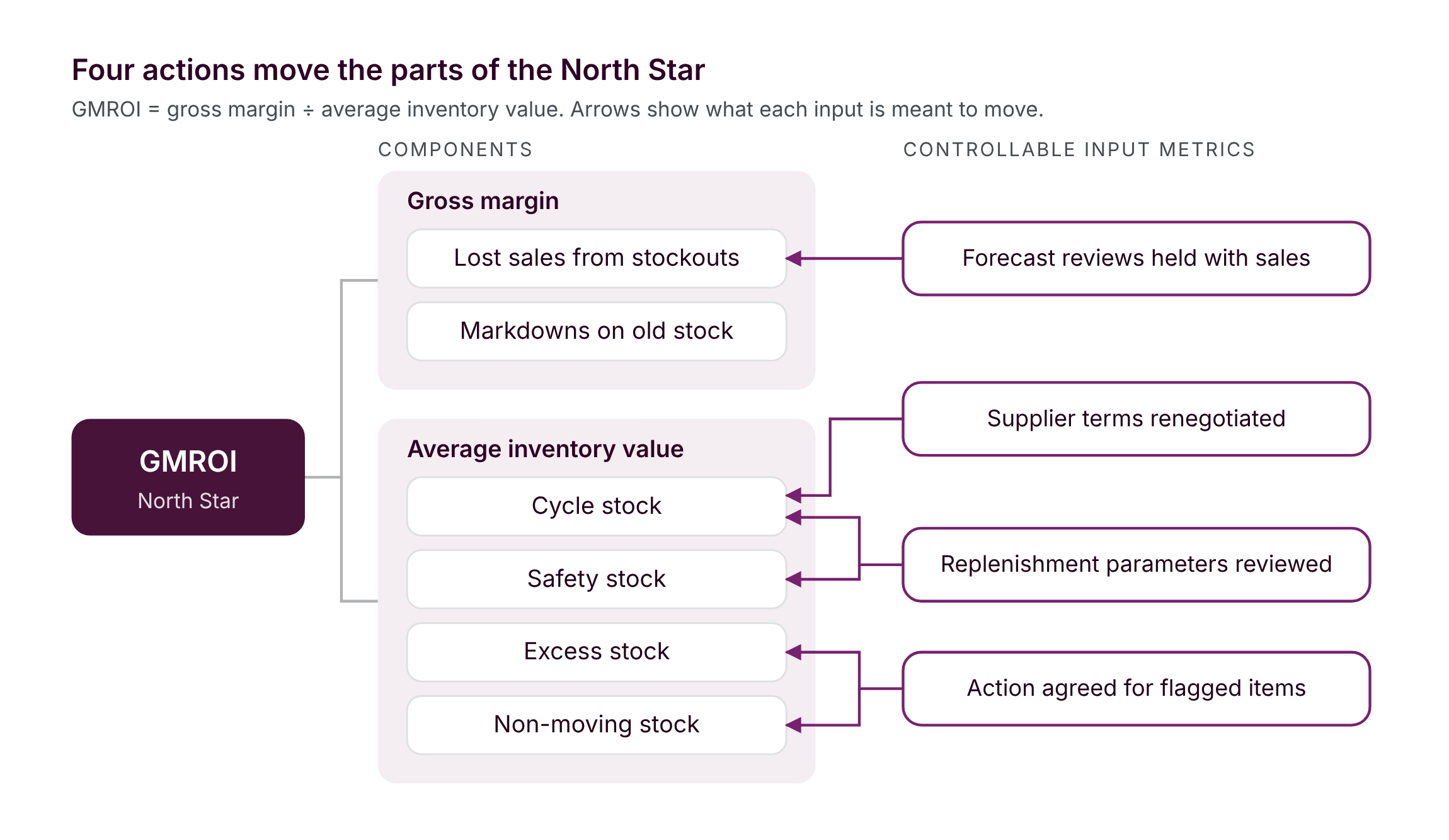
A good North Star for inventory captures both availability and capital in one number. We often use gross margin return on inventory (GMROI). Put simply, it shows how hard your stock is working. If every euro tied up in stock generates three euros in gross margin over a year, your GMROI is 3. It rises when you sell more at a healthy margin, and it also rises when you can achieve the same sales with less inventory.
The components break down the North Star so you can see what’s driving it:
- Gross margin, split into sales and margin. Lost sales from stockouts show up here, as do markdowns from clearing old stock.
- Average inventory value, broken down by the role the stock plays: cycle stock that turns over as planned, safety stock that protects service levels, excess stock above what the policy calls for, and stock that no longer moves.
That second breakdown matters. Most companies track total inventory value, but that number alone cannot tell a planned buffer from a mistake.
And telling them apart is the whole point.
The controllable input metrics reflect actions someone can actually take, each linked to the component it is meant to influence:
- Replenishment parameters reviewed on schedule for each segment, affecting safety and cycle stock.
- An action agreed for every flagged slow-moving item, whether that’s a campaign, a return to the supplier or a write-off, reducing excess and non-moving stock.
- Forecast reviews held with sales for items where forecasts matter, affecting both lost sales and excess stock, since a forecast that drifts in either direction will show up in one of them.
- Lead times and minimum order quantities renegotiated with key suppliers, affecting cycle stock.
Each of these is a hypothesis: we believe taking this action will improve that component. The tree makes the hypothesis explicit, and the follow-up shows whether it worked.
STEP 2 – SEGMENTS AND POLICIES
No single replenishment rule works for thousands of items. The classic starting point is ABC classification based on annual value, which helps identify where to focus attention. But two A-items can end up in the same category for very different reasons. One might be an expensive, high-margin item that rarely sells: it has little impact on service levels and is risky to keep in stock. The other might be a cheap item that sells all the time: it drives service levels and carries little risk when purchased in large quantities.
Value alone cannot tell them apart, so we also look at how often an item sells and how much demand varies. Each segment then gets its own policy: how much to buy, how often to buy it and what service level to aim for.
This is where the agents come in. The method itself is well known; the hard part is keeping it up to date across the entire product range. Built on the right data foundation, an agent can:
- Propose the segmentation based on sales history and test whether the boundaries actually separate items with different demand patterns.
- Suggest a policy per segment, including service levels and order quantities, and show how each choice affects tied-up capital before anyone commits to it.
- Flag items that move between segments, such as a former A-item that’s slowing down and should no longer be replenished in the same way.
- Identify sell-out candidates and explain the reasoning behind each one, while also highlighting items where buying in large quantities carries little risk.
- Prepare the Weekly Business Review, distinguishing real deviations from normal variation and drafting suggested actions.
The metric owner, usually the inventory manager or head of supply chain, still makes the decisions. The agent makes the analysis cheap enough to repeat every week.
STEP 3 – INVENTORY HEALTH
Overstock only means something in relation to a target. Once every segment has a policy, inventory health becomes a question we can actually answer: how far is the actual stock level from where the policy says it should be? That’s why we usually segment first, before defining the health metrics.
A small set of metrics goes a long way:
- Excess stock value: stock above the policy maximum, by segment and item.
- Non-moving stock value: stock with no outbound movement over an agreed period.
- Service level against target for each segment, so that low stock in a high-priority segment becomes visible just as quickly as high stock in a low-priority one.
Together, these metrics help distinguish healthy inventory from stock that needs attention. In the Weekly Business Review, an agent can go through every segment, filter out normal variation and highlight the few items that actually need action, each with a suggested next step for the owner to accept or adjust. on top of a data foundation that holds.
WHAT IT TAKES
As Jonas wrote, agents are only as reliable as the foundation they are built on. For inventory, that means three things.
A data model that connects the flows: sales, purchases, stock levels, lead times and order quantities in one place. In our experience, lead times are often the data nobody maintains, entered into the ERP system once and then left untouched, even as suppliers and conditions change.
One agreed definition per metric, so that excess stock and service level mean the same thing to everyone. Where supply chain and finance have good reasons to look at things differently, both views can exist, as long as they’re clearly defined.
Business context that only the business can provide. Which items are strategically important even when they sell slowly, which are tied to customer agreements and which are seasonal. Without that context, an agent might happily recommend clearing out an item that a key customer depends on
WHERE TO START
Start by segmenting the entire product range, since an item’s segment only makes sense in relation to all the others. Then focus on the areas where improvements will have the most immediate impact, such as clearing stock that no longer moves or fine-tuning replenishment policies for the items that drive service levels. Follow up weekly on a few health metrics, even if some of the data is still handled manually. The habit of taking ownership often comes before the technology.
In his next post, Jonas will go deeper into the data foundation that all of this depends on. Until then, one thought from my years in replenishment planning: the problem was rarely a lack of method. It was finding the time to apply it to every item, every week.
And that’s what’s changing now.
/Johan

JOHAN TULLGREN
WANT TO KNOW MORE?
Get in touch if you want to talk about how metrics and AI agents can support your inventory management.
Johan Tullgren
BI Manager
johan.tullgren@climber.se
+46 76 341 04 97
Samantha Hartley
Marketing & Content Manager
samantha.hartley@climber.se
+46 70 746 75 34
News

From North Star to shelf: Run your inventory with Metrics and AI Agents
Discover how AI agents in inventory management help optimise stock levels, reduce excess inventory & support smarter replenishment decisions. Read the blog by Johan Tullgren here.
Read more
FabCon Europe 2026
Climber recently spent a few days in Barcelona at FabCon Europe 2026, getting properly into what’s next for Microsoft Fabric, Power BI, and the wider Microsoft data and AI ecosystem.
>> Read more
What’s New in Qlik Cloud – October 2026
Qlik Answers gains Fast and Thinking modes for assistants and your AI assistant can now build scheduled and triggered automations. Qlik Data Integration also has a good mix of practical improvements and developments.
>> Read more